

- Tags: acf, advanced custom fields, custom fields, field manager, acf addon
- Requires at least: 6.6
- Tested up to: 6.9
- Requires PHP: 8.1
- Stable tag: 1.1.4
- License: GPLv3 or later
- License URI: https://www.gnu.org/licenses/gpl-3.0.html
LivePreview, instant field search, code snippets, and bulk management tools for faster custom field development.
Description
Add powerful productivity features to your custom fields workflow. See changes in real-time, find any field instantly, and access ready-to-use code templates.
Click the image above to watch the full demo on YouTube
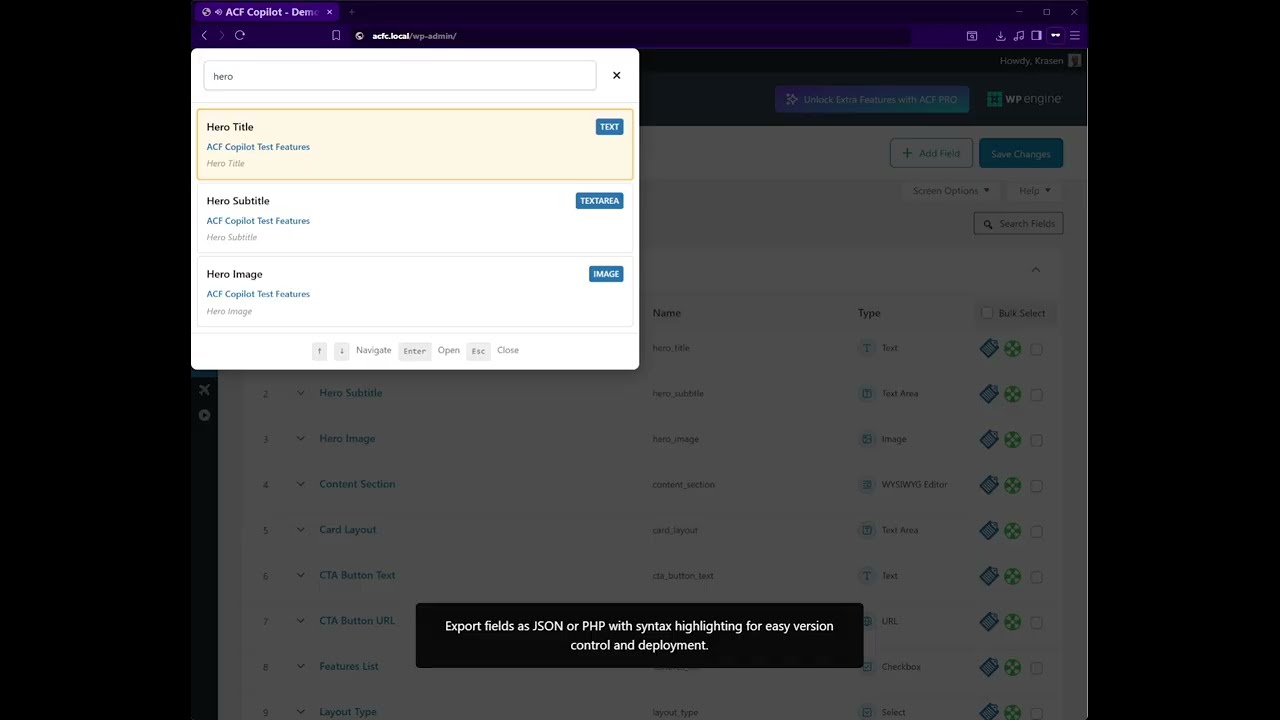
Stop switching between edit screens and preview windows. This plugin brings LivePreview directly into your field editor, letting you see changes in real-time as you type. Find any field instantly with the keyboard shortcut Ctrl/Cmd + K, access ready-to-use code snippets, and speed up development with Bootstrap 5 HTML components.
Key Features
- LivePreview – See field changes in real-time without leaving the editor
- Instant Field Search – Find any field across all groups with Ctrl/Cmd+K
- Code Snippets – Ready-to-use PHP templates for groups and repeaters
- HTML Components – Bootstrap 5 compatible components for faster frontend development
- Inline Help – Context-sensitive guidance and tips
- Bulk Management – Delete multiple field groups with one click
How It Works
- Install and activate (requires Advanced Custom Fields plugin)
- Edit any field group and enable LivePreview in the metabox
- Watch your changes appear in real-time as you add/edit fields
- Press Ctrl/Cmd + K to instantly search across all field groups
- Access code snippets and HTML components from the menu
No complex setup required – works immediately with both ACF Free and ACF Pro.
Perfect For
- Theme developers building custom themes
- Agency developers managing multiple client sites
- Site builders creating complex field architectures
- Freelancers who need to work faster
- Content managers who want visual feedback
- Beginners learning who need code examples
Installation
From Dashboard
- Go to Plugins > Add New
- Search for “ACF Copilot”
- Click Install Now, then Activate
Manual Installation
- Download the plugin ZIP file
- Upload to /wp-content/plugins/
- Activate from Plugins menu
After Activation
- Click the menu item in admin
- Browse Code Snippets to see available templates
- Check out HTML Components for frontend patterns
- Edit any field group to enable LivePreview
- Press Ctrl/Cmd + K to try the field search feature
- Visit Settings to customize plugin options
Frequently Asked Questions
Does this require Advanced Custom Fields?
Yes, this is an add-on for Advanced Custom Fields. You must have either ACF Free or ACF Pro installed and activated. The plugin works with both versions.
Is this compatible with all field groups?
Yes, supports all field groups created with Advanced Custom Fields, including complex field types like repeaters, flexible content, and clone fields.
Will the plugin modify my existing fields?
No, does not modify your existing fields or data. It enhances your workflow with tools like LivePreview, search, and code snippets. Your original field groups remain completely unchanged.
Does LivePreview work with Block Editor?
In the free version, LivePreview supports Classic Editor only. In the Pro version, LivePreview works with both Classic and Block (Gutenberg) editors.
Can I use this with custom post types?
Yes, but with limitations. Field Search and Code Snippets work with all post types. LivePreview for custom post types requires the Pro version.
Do I need coding skills?
Not at all! The plugin is beginner-friendly. LivePreview and Field Search require zero coding knowledge. Code Snippets provide copy-paste templates even if you’re new to PHP.
What’s the difference between free and Pro?
The free version includes LivePreview (Classic Editor), Field Search, basic code snippets, HTML components, and bulk delete. The Pro version adds AI field generation, Block Editor support, CPT LivePreview, advanced snippets, database cleanup, and priority support.
Can I use this with Multisite?
The free version works on multisite but without network-level features. The Pro version includes full multisite support with network admin controls.
Does it work with ACF Pro’s flexible content?
Yes, Field Search works with flexible content fields. Code snippets for flexible content layouts are available in the Pro version.
Will this slow down my admin?
No, loads only on relevant admin screens and uses efficient code. The plugin is optimized for performance with minimal database queries and conditional asset loading.
How does the AI Field Group Generator work? (Pro)
Describe your fields in plain English: “Create a team member with name, photo, bio, and social links.” The AI generates a complete field group with proper field types and settings – ready to use immediately.
Do you provide support for the free version?
Yes, community support is available through the WordPress.org support forum. Response times are typically 24-48 hours. The Pro version includes priority email support with same-day responses.
Screenshots


Changelog
1.1.2
- Security – Fixed CSRF vulnerability in settings reset with proper nonce and capability verification
- Security – Fixed unescaped output in custom help tabs using wp_kses_post() escaping
- Security – Removed insecure file_get_contents() fallbacks in code snippets and HTML components
- Security – Added nonce verification and capability checks to WP Pointer AJAX dismissal
- Fix – Replaced loose comparisons (!#) with strict comparisons (!##) for WPCS compliance
- Update – Updated all file-level DocBlocks with proper descriptions and @since tags (31 files)
- Update – Added comprehensive inline documentation for all classes and methods
- Update – Localized all JavaScript strings (alerts, confirms, messages) via wp_localize_script()
- Update – Made all PHP and JavaScript strings fully translation-ready
- Update – WordPress Coding Standards (WPCS) compliance across the entire codebase
- Update – Removed all phpcs:ignore comments after fixing underlying issues
- Update – Production-ready with a comprehensive security audit completed
1.1.1
- Update – Compatibility and maintenance release
- Update – Tested with WordPress 6.8
- Update – Tested with ACF 6.4
1.1.0
- New – Field Search: Instantly find any field with Ctrl/Cmd+K keyboard shortcut
- New – Search Fields button in toolbar for mouse users
- New – LivePreview auto-refresh after clicking Update/Publish
- New – Welcome onboarding notice for first-time users
- New – WP Pointer highlighting the main menu on activation
- Update – Complete LivePreview rewrite with modern architecture
- Update – Now works with both Classic and Block (Gutenberg) editors
- Update – Event-driven updates instead of polling
- Update – 2-second debouncing for better performance
- Update – Visual syncing indicator shows when the preview is updating
- Update – Better error handling with user-friendly messages
- Update – Step-by-step usage guide in LivePreview metabox
- Fix – HTML Components AJAX handler now works correctly
- Fix – Component path mapping fixed for all component types
- Fix – Nonce verification added to all component requests
- Fix – Bulk Delete CSS disables native drag handles when checkboxes are selected
- Remove – Bulk Drag & Drop (conflicted with native functionality)
- Update – Better code organization and file structure
- Update – Updated documentation throughout
- Update – Various performance optimizations
1.0.5
- Fix – Added proper sanitization for register_setting()
- Fix – Stricter nonce verification using check_admin_referer() and check_ajax_referer()
- Fix – Added capability checks (manage_options) before all admin actions
- Fix – Ensured unauthorized users cannot bypass dismissals or settings updates
- Update – Removed deprecated load_plugin_textdomain() function
1.0.4
- Update – Removed bitly.com links, replaced with direct analytics-tracked URLs
- Fix – Notice translation loading for the domain triggered too early
1.0.3
- Update – Compatibility tested with WordPress 6.8
- Update – Compatibility tested with ACF 6.4
- Fix – Minor styling inconsistencies
1.0.2
- New – Hide setting notices after save for cleaner UI
- Update – Performance and optimization improvements
- Update – Code quality enhancements across all files
- Update – Updated copyright year 2024 to 2025
- Fix – Minor JavaScript and CSS fixes
1.0.1
- New – Added Pro vs Free comparison table under Settings
- Update – Development environment and build system updates
- Fix – Sanitized all database fields
- Fix – Replaced json_encode() with wp_json_encode()
- Fix – Replaced file_get_contents() with wp_remote_get() for remote files
1.0.0
- Initial public release
- LivePreview for field groups (Classic Editor)
- Code Snippets library with field group templates
- HTML Components (Base HTML and Bootstrap 5)
- Bulk field group delete functionality
- Inline help system with tooltips
- Settings page with plugin options
Upgrade Notice
1.1.2
Important security update with CSRF protection, output escaping fixes, and WPCS compliance improvements. Recommended upgrade for all users.
1.1.0
Major update: New Field Search feature (Ctrl/Cmd+K), completely rewritten LivePreview, and numerous improvements.
1.0.0
Initial release with LivePreview, Code Snippets, HTML Components, and Field Search.