

- Tags: internal linking, breadcrumbs, table of contents, related posts, seo
- Requires at least: 6.6
- Tested up to: 6.9
- Requires PHP: 8.1
- Stable tag: 1.1.2
- License: GPLv3 or later
- License URI: https://www.gnu.org/licenses/gpl-3.0.html
Automatic contextual links, breadcrumbs, table of contents, and related posts to boost SEO and engagement.
Description
Generate breadcrumbs, table of contents, contextual links, and related posts automatically. Analyze your content and create connections that improve SEO and keep visitors engaged.
Click the image above to watch the full demo on YouTube
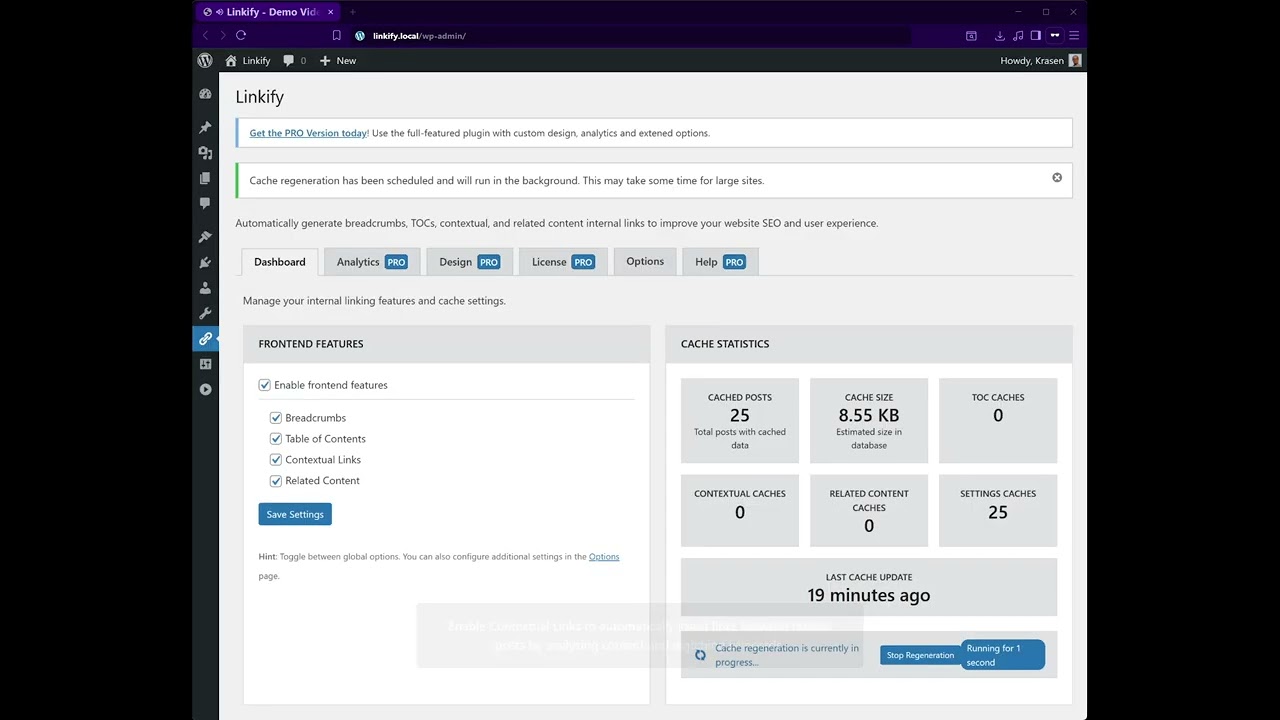
Stop manually creating navigation and content links. This plugin analyzes your content and automatically generates contextual links, SEO-friendly breadcrumbs, a table of contents for long posts, and related content sections.
Key Features
- Automatic contextual linking between posts
- Breadcrumbs navigation for site hierarchy
- Auto-generated table of contents from headings
- Related posts based on content similarity
- Performance-optimized caching
- Custom post type support
- SEO improvements
How It Works
- Install and activate
- Navigate to plugin settings in the admin menu
- Enable features: Breadcrumbs, Table of Contents, Contextual Links, Related Posts
- Configure settings for each feature
- Plugin analyzes content and generates connections automatically
- Elements appear on your posts automatically
Zero manual work required – creates connections automatically based on content analysis.
Use Cases
- Optimize site architecture for SEO
- Improve content discoverability
- Create better user navigation
- Add TOC to long articles
- Connect related product content
- Keep visitors engaged longer
Installation
From Dashboard
- Go to Plugins > Add New
- Search for “Linkify”
- Click Install Now, then Activate
Manual Installation
- Download the plugin ZIP file
- Upload to /wp-content/plugins/
- Activate from the Plugins menu
After Activation
- Navigate to plugin settings in the admin menu
- Go to Options tab to select supported post types
- Enable desired features: Breadcrumbs, Table of Contents, Contextual Links, Related Posts
- Customize settings for each feature
- Configure keyword threshold for contextual links
- Set the number of related posts to display
- Save settings and clear cache if needed
- Visit posts to see automatic connections
Frequently Asked Questions
How does this improve SEO?
Contextual links help search engines discover content, understand site structure, and distribute page authority. The plugin automatically creates connections that strengthen SEO by linking related content.
How do I add breadcrumbs?
Enable the Breadcrumbs feature in plugin settings and save. Breadcrumbs automatically appear before post titles, showing site hierarchy (Home > Category > Post).
How do I create a table of contents?
Enable the Table of Contents feature in settings. TOC automatically generates from post headings (H1-H6) and displays at the beginning of posts with clickable anchor links.
Will this slow down my site?
No, the plugin uses efficient caching to ensure no performance impact. Elements are generated once and cached for fast page loads.
Can I customize breadcrumbs’ appearance?
Basic breadcrumb styling is included in the free version. The Pro version offers extensive design customization with multiple layout options.
How does contextual linking work?
The plugin analyzes content to identify keywords and find related posts. Contextual links are automatically inserted by matching keywords with relevant content.
Can I control which posts get links?
Yes, select post types in options and exclude specific posts by ID. The Pro version includes per-post settings for granular control.
Does this work with the Block Editor?
Yes, fully compatible with Block Editor and Classic Editor. All features work seamlessly with both editors.
How are related posts determined?
Uses content similarity analysis to compare posts. An algorithm analyzes keywords, categories, tags, and content to find the most relevant recommendations.
Can I use this with custom post types?
Yes, supports custom post types. Select which post types should have features enabled in the plugin options.
Will this modify my content?
No, does not modify content in your database. Elements are generated dynamically and cached without altering the original post content.
How do I clear the cache?
Go to the plugin dashboard and click the Clear Cache button. This removes cached elements. Click Regenerate to rebuild the cache with updated content.
Does this work with Multisite?
Yes, compatible with Multisite installations. Configure settings independently for each site in your network.
Screenshots


Changelog
1.1.1
- Update – Pro comparison table matches website free vs pro features
- Update – Rebuilt .pot language translation file
1.1.0
- Security – Added nonce verification for AJAX functions
- Security – Fixed wp_kses() parameter order
- Security – Changed role check to manage_options capability
- Security – Added nonce verification to WP pointer dismiss
- Fix – Breadcrumbs now only show before main post title
- Fix – Fixed cache regeneration with empty content
- Fix – Fixed division by zero in similarity calculation
- Fix – Added content validation for processing
- Fix – Fixed constructor typo in class documentation
- New – Onboarding notice for setup
- New – Quick links to Dashboard, Settings, and Tutorial
- Update – Rating notices delayed 7 days
- Update – Moved inline CSS to SCSS for standards
- Update – Enhanced security with capability checks
- Update – Improved error handling
1.0.7
- New – WP pointer for first-time users
- Update – Pro table display for features
- Update – Toggle between free and pro plugins
- Update – Pro feature tabs with site links
- Update – Language file (.pot)
- Fix – Stylesheet fixes for the interface
1.0.6
- Fix – Stricter nonce verification for nav tabs
- Fix – Escaped all echoed variables for security
- Update – Removed deactivate_plugins() functions
1.0.5
- Fix – Replaced and removed pro text
- Fix – Proper sanitization for register_setting()
- Fix – Rating notice variable correction
- Update – Removed deprecated load_plugin_textdomain()
- Update – Removed pro promo code container
1.0.0
- Initial release
- Automatic contextual links for posts
- Breadcrumbs navigation for site hierarchy
- Table of contents generator from headings
- Related posts based on content similarity
- Contextual link building with keyword matching
- Performance caching for speed
- Custom post type support
Upgrade Notice
1.1.1
Improvements with updated pro comparison and language files.
1.1.0
Major security update with nonce verification, bug fixes for breadcrumbs and cache, plus onboarding improvements. Highly recommended upgrade.
1.0.0
Initial release with breadcrumbs, table of contents, contextual links, and related posts.