

- Tags: media library, media recovery, restore images, lost media, migration
- Requires at least: 6.6
- Tested up to: 6.9
- Requires PHP: 8.1
- Stable tag: 1.8.2
- License: GPLv3 or later
- License URI: https://www.gnu.org/licenses/gpl-3.0.html
Restore lost images and recover missing files after migration, hosting transfer, or database restore.
Description
Recover files that exist on your server but don’t appear in your Media Library. After site migrations, hosting transfers, or database restores, image files often get orphaned – this plugin reconnects them.
Click the image above to watch the full demo on YouTube
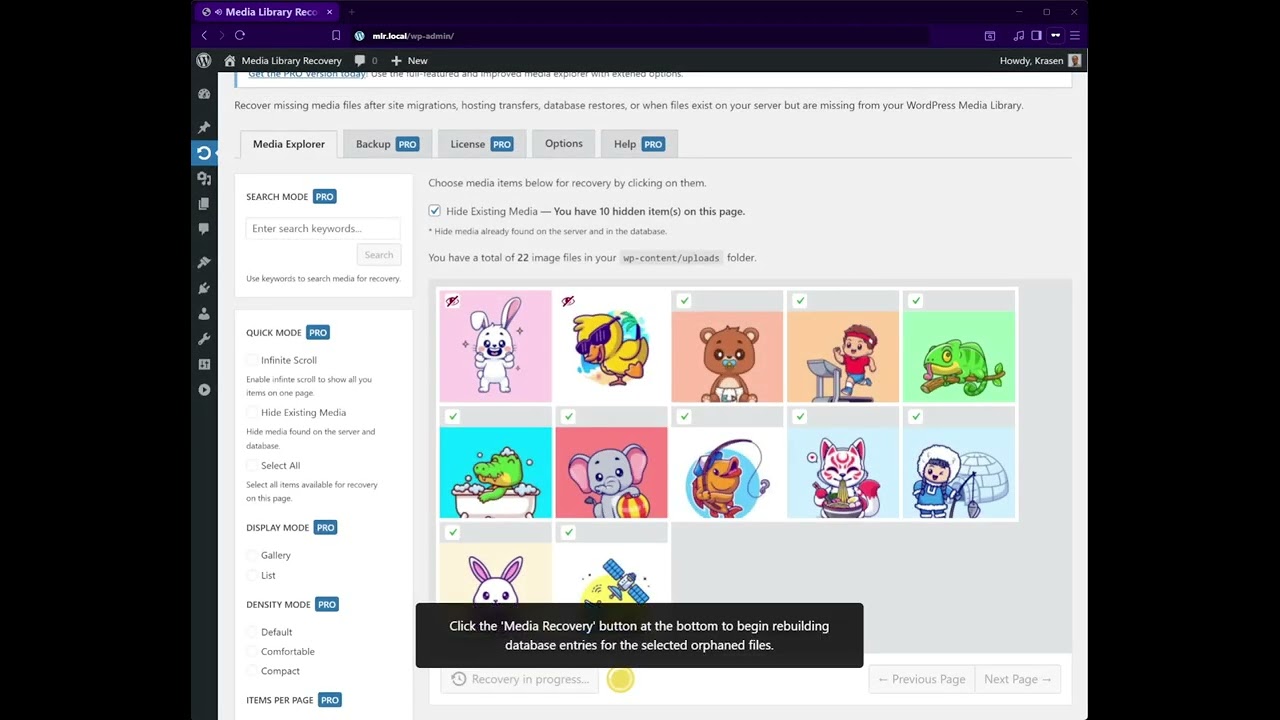
Have images on your server, but they don’t appear in your Media Library?
This plugin solves the common problem where image files exist in wp-content/uploads but are missing from the database. It scans your uploads folder, finds orphaned files, and rebuilds database entries to restore them to your Media Library.
Key Features
- Restore lost Media Library files
- Fix orphaned files on the server
- Visual Media Explorer interface
- No file upload required
- After migration recovery
- Hosting transfer support
- Batch processing
How It Works
- Install and activate
- Navigate to Media > Media Recovery
- Media Explorer shows all orphaned files
- Select up to 10 images to recover (free version)
- Click the Media Recovery button to rebuild the database
- Check Media > Library to confirm restoration
- Repeat for additional batches
Zero file uploads – plugin only reconnects existing server files to the database.
Use Cases
- Move sites from localhost to production
- Migrate to a new hosting provider
- Recover from database restore issues
- Fix the broken Media Library after migration
- Resolve orphaned file problems
- Transfer between staging and production
Installation
From Dashboard
- Go to Plugins > Add New
- Search for “Media Library Recovery”
- Click Install Now, then Activate
Manual Installation
- Download the plugin ZIP file
- Upload to /wp-content/plugins/
- Activate from the Plugins menu
After Activation
- Go to Media > Media Recovery
- Media Explorer displays all files in the uploads folder
- Toggle Hide Existing to show only orphaned files
- Select up to 10 images with checkboxes
- Click the Media Recovery button
- Wait for the database rebuild to complete
- Check Media > Library to verify restoration
Frequently Asked Questions
My images disappeared after migrating my site. Can this help?
Yes! After the site migration, files exist in your uploads folder, but database entries are missing. This plugin scans your files and rebuilds the database entries to restore your Media Library.
I transferred to a new hosting and lost my media library. What do I do?
Install this plugin, go to Media > Media Recovery, and it shows all files on your server missing from the database. Select and recover them in batches of 10 until everything is restored.
How is this different from backup plugins?
Backup plugins restore entire sites. This plugin specializes in recovering files when they exist on your server but are missing from the database – common after migrations, hosting transfers, or partial database restores.
Why can I only recover 10 files at a time?
The free version processes 10 files per batch to prevent server timeouts. Run multiple batches to recover unlimited total files. The Pro version offers unlimited batch sizes with background processing.
Will I get duplicate files?
No, the plugin won’t duplicate or overwrite existing image files. It only rebuilds database entries for orphaned files missing from the Media Library.
Is this compatible with Multisite?
Multisite support is available in the Pro version. The free version works on single installations only.
Which folders are scanned?
The free version scans only the default wp-content/uploads folder. The Pro version allows custom upload folder paths.
Can I recover all file types?
The free version restores image files only. The Pro version supports all media types, including videos, PDFs, documents, and audio files.
Does this upload files to my server?
No, the plugin never uploads or overwrites files. It only scans existing files on your server and rebuilds database entries to reconnect them to the Media Library.
What happens during the recovery process?
The plugin scans your uploads folder, identifies orphaned files, and then rebuilds database entries, including attachment posts, metadata, and thumbnail references. Files remain on the server unchanged – only database connections are restored.
Can I recover files after a database restore?
Yes, if you restored the database from backup but files remained on the server, this plugin reconnects those orphaned files to your restored database automatically.
Does this work with custom upload folders?
Custom upload folder scanning is available in the Pro version. The free version scans the default wp-content/uploads directory only.
Can I see which files are orphaned before recovering?
Yes, Media Explorer shows all files with color-coded status. Orange icons indicate orphaned files missing from the database. Green checkmarks show files already in Media Library.
Screenshots


Changelog
1.8.1
- Security – Added nonce verification to wp-pointers.php AJAX for CSRF protection
- Security – Added nonce and capability checks to mlr_reset_settings()
- Security – Fixed missing translation functions for wp_die() permission messages
- Security – Fixed missing translation for wp_send_json_success()
- Fix – Replaced string concatenation with sprintf() and proper escaping
- Fix – Removed unnecessary esc_sql() from get_posts() query
- Fix – Changed pagination validation to absint() for proper integers
- Fix – Added translation functions to all placeholder attributes
- Fix – Made “Reload…” and “No more results” translation-ready
- Update – Added comprehensive file-level DocBlocks to 38 PHP files
- Update – Improved code documentation
- Update – All files validated with PHP syntax checking
1.8.0
- New – Dashboard Widget with recovery statistics and quick actions
- New – Onboarding notice for first-time users with quick start
- New – AJAX handler for dismissing onboarding notice
- Update – Improved dashboard integration with recovery status
- Update – Better visual icons and styling for onboarding
- Update – Compiled and minified CSS/JS for performance
- Fix – JavaScript typo in mlr-admin.js
- Fix – Added proper escaping and sanitization for security
1.0.0
- Initial release
- Recover lost Media Library files after migration
- Media Explorer for viewing orphaned files
- Batch recovery for up to 10 images at once
- Database rebuild engine
- Color-coded file status indicators
- Hide existing files to show only orphaned
- Support for image file recovery
Upgrade Notice
1.8.1
Critical security update with CSRF protection, nonce verification, and comprehensive coding standards compliance. Highly recommended upgrade for all users.
1.8.0
Major update with Dashboard Widget, onboarding notice, and improved interface. Recommended upgrade.
1.0.0
Initial release for restoring lost Media Library files after migration.