


Performing scheduled maintenance on your WordPress website shouldn’t mean losing your SEO rankings or frustrating visitors with error messages. The Developry WP Maintenance Mode plugin offers a professional, lightweight solution that displays a custom maintenance page while you work on your site-without affecting administrators or search engine optimization.
What Makes This WordPress Maintenance Mode Plugin Different?
Most maintenance mode plugins force you to use specific themes or page builders, creating unnecessary dependencies that can break when you switch themes or update WordPress. The Developry WP Maintenance Mode plugin takes a different approach: it’s completely theme-agnostic, meaning it works seamlessly with any WordPress theme out of the box.
Available as a free, open-source plugin on GitHub at https://github.com/krasenslavov/developry-wp-maintenance-mode, this maintenance solution prioritizes simplicity, security, and SEO best practices.
Key Features of Developry WP Maintenance Mode
1. Universal Theme Compatibility
Unlike maintenance plugins that only work with specific themes like GeneratePress, Astra, or Divi, this plugin works with any WordPress theme. Whether you’re using a custom theme, a premium theme, or a free theme from the WordPress repository, the maintenance mode functionality integrates seamlessly.
2. One-Click Toggle from Admin Bar
Administrators can enable or disable maintenance mode with a single click directly from the WordPress admin bar. The intuitive toggle button displays the current status-“Maintenance ON” or “Maintenance OFF”-making it impossible to forget whether your site is in maintenance mode.
3. SEO-Friendly HTTP Headers
Search engines need to know that your site’s downtime is temporary. The plugin automatically sends proper 503 Service Unavailable HTTP status codes along with Retry-After headers set to 3,600 seconds (1 hour by default). This tells search engines to check back later rather than removing your pages from their index.
4. Custom Maintenance Pages with Block Editor
Create professional maintenance pages using WordPress’s native Gutenberg block editor. No need to learn new interfaces or page builders-simply:
- Create a new page in WordPress
- Select the “Maintenance Mode” template from the page attributes
- Design your custom maintenance page with any blocks you want
- Publish the page
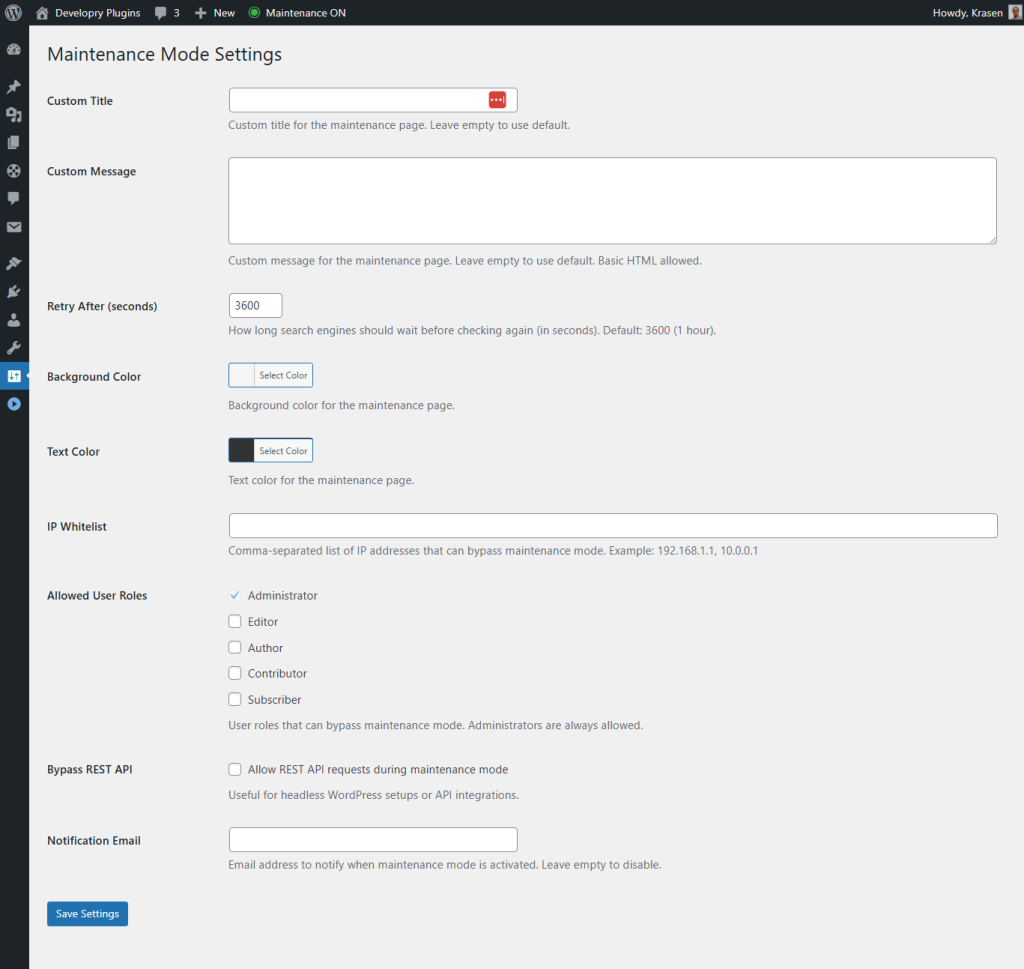
The plugin automatically displays your custom page whenever maintenance mode is active.
5. Smart Administrator Access
While maintenance mode is active, all administrators retain full access to both the frontend and backend of your website. This means you can continue working on your site, testing changes, and viewing the live site exactly as visitors will see it once you disable maintenance mode.
6. IP Address Whitelisting
Need to grant access to specific clients, developers, or team members who aren’t WordPress administrators? The plugin includes IP whitelisting functionality that allows you to specify which IP addresses can bypass maintenance mode and view the live site.
7. Role-Based Access Control
Configure which WordPress user roles can access the site during maintenance mode. While administrators have access by default, you can also grant access to editors, authors, or custom roles depending on your workflow requirements.
8. Email Notifications
Stay informed about maintenance mode status changes with automatic email notifications. Configure the plugin to send alerts whenever maintenance mode is activated or deactivated, including details about who made the change and when.
9. REST API Bypass Option
If you’re running headless WordPress or using the REST API for mobile apps or external integrations, you can enable REST API bypass to keep your API endpoints accessible while the frontend displays the maintenance page.
Technical Excellence and Security Features
Robust Security Implementation
Security isn’t an afterthought in this plugin-it’s built into every function:
- Nonce verification protects all toggle actions from CSRF attacks
- Capability checks ensure only authorized users can enable maintenance mode
- Input sanitization prevents malicious data injection
- Output escaping protects against XSS vulnerabilities
- Safe redirects using WordPress’s
wp_safe_redirect()function
WordPress Coding Standards Compliance
The entire codebase follows WordPress Coding Standards with:
- Proper namespacing (
DWPMMnamespace) to prevent conflicts - Comprehensive PHPDoc comments on all functions
- Internationalization support for translations
- Semantic function naming
- Organized file structure
Performance Optimized
With a minimal footprint, the plugin adds virtually no overhead to your site:
- Lightweight CSS files (separate admin and frontend stylesheets)
- No JavaScript dependencies for core functionality
- Efficient database queries with proper caching
- Conditional asset loading (frontend CSS only loads when needed)
Multisite Compatible
Running a WordPress multisite network? The plugin fully supports multisite installations and properly cleans up options from all sites in the network when uninstalled.
Installation and Setup in Minutes
Getting started with Developry WP Maintenance Mode takes less than five minutes:
From GitHub
- Download the latest release from https://github.com/krasenslavov/developry-wp-maintenance-mode
- Upload the plugin folder to
/wp-content/plugins/ - Activate through the WordPress admin dashboard
- Click the admin bar toggle to enable maintenance mode
Via Git Clone
Developers can clone the repository directly:
cd wp-content/plugins
git clone https://github.com/krasenslavov/developry-wp-maintenance-mode.git
Then activate the plugin through the WordPress admin panel.
Customization and Advanced Settings
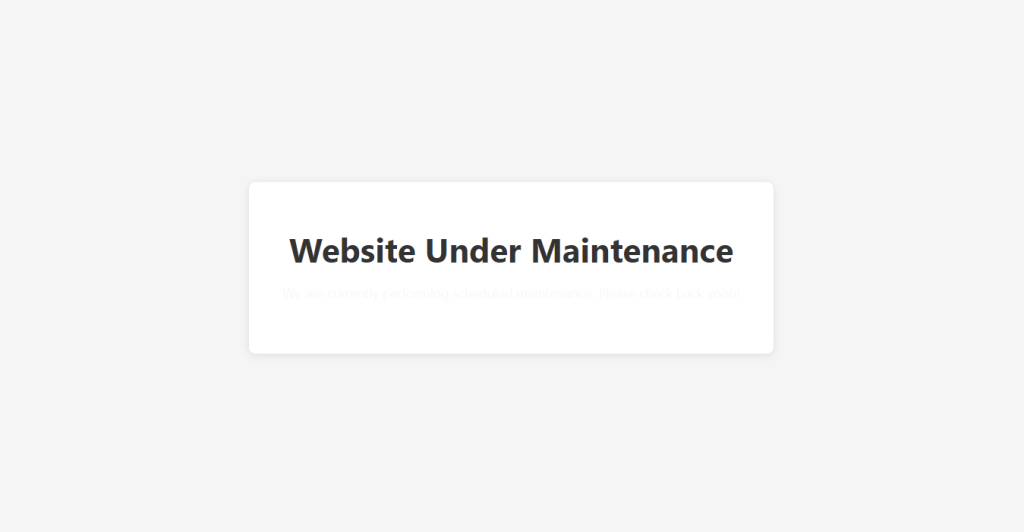
Access advanced settings through Settings → Maintenance Mode in your WordPress admin:
- Custom Messages: Override default maintenance messages
- Retry-After Duration: Configure how long search engines should wait
- IP Whitelist: Add comma-separated IP addresses for bypass access
- Allowed Roles: Select which user roles can access the site
- Notification Email: Set the email address for status change notifications
- REST API Bypass: Toggle whether REST API remains accessible
Real-World Use Cases
This maintenance mode plugin shines in several scenarios:
Scheduled Site Updates
Before updating WordPress core, themes, or plugins, enable maintenance mode to prevent visitors from encountering broken pages or error messages during the update process.
Design Overhauls
When redesigning your site or switching themes, maintenance mode gives you time to perfect the new design without exposing work-in-progress pages to visitors.
Content Migration
Migrating content from another platform? Enable maintenance mode while you import posts, pages, and media to ensure visitors see a polished site.
Technical Troubleshooting
When diagnosing complex issues or performing database maintenance, maintenance mode provides a professional holding page rather than error messages.
Translation Ready and Global-Friendly
The plugin includes full internationalization (i18n) support with the text domain developry-wp-maintenance-mode. Create translations using:
- Loco Translate plugin for in-dashboard translation
- Traditional .po/.mo files in the
/languagesdirectory - Translation plugins like WPML or Polylang
Clean Uninstallation
If you ever need to remove the plugin, it handles uninstallation gracefully:
- Automatically removes all plugin options from the database
- Cleans up settings from all sites in multisite networks
- Leaves no orphaned data behind
Open Source and Community-Driven
As an open-source project licensed under GPLv2 or later, the plugin welcomes community contributions. Report bugs, request features, or contribute code through the GitHub repository’s issue tracker.
The Maintenance Mode Plugin WordPress Needs
The Developry WP Maintenance Mode plugin delivers exactly what WordPress site owners need: a simple, secure, SEO-friendly maintenance solution that works with any theme. With zero configuration required for basic use and advanced options available for complex scenarios, it strikes the perfect balance between simplicity and flexibility.
Whether you’re a freelance developer managing client sites, an agency handling multiple projects, or a site owner performing routine maintenance, this plugin provides professional maintenance mode functionality without the bloat of enterprise solutions or the limitations of theme-specific alternatives.
Download the free plugin today from GitHub and experience maintenance mode the way it should be: simple, secure, and seamless.
Author: Krasen Slavov
Website: https://krasenslavov.com/
Company: Developry Ltd. License: GPLv2 or later
Repository: https://github.com/krasenslavov/developry-wp-maintenance-mode